Overview
Wherefore Daps
Section titled “Wherefore Daps”Note: Daps is still new and updated frequently. Using it assumes some risk.
You are an individual artist, hobbyist, or small business. You own one or more websites. You don’t want to be locked into a specific hosting provider. You want to own your data and take it with you when you leave.
Bonus: you want to save money by running multiple websites within a single VPS instance.
Alternative scenario: you don’t have or want a public website but you use products like Google Docs and don’t want to depend as much on third parties (and you want to own your data). But managing FOSS (Free Open Source Software) alternatives is daunting. Daps could make it easier.
You should be able to:
- pick some web technology you want to use (e.g Wordpress, or a custom website)
- develop it on your local computer
- run and test it on your local computer (dev)
- deploy it to a remote hosting provider (production aka prod)
- synchronize any data and/or files captured at the hosting provider back to your local computer (like if you have a blog and people leave comments)
- make and restore backups
- push changes and updates to prod
- delete your data/files from the hosting provider
- deploy it again somewhere else
- try to avoid lock-in and enshitification
Technology
Section titled “Technology”The basis for this is containerization with Docker. Lots of FOSS is available as docker images and it’s fairly easy to create your own.
You have a computer, say a laptop. It shouldn’t matter whether you’re running Windows, Mac or Linux. You have these prerequisites (see the setup readme for specifics):
- docker desktop running locally
- git
- bash (git bash for Windows)
- .NET SDK
Daps enables 2 environments:
- the local docker which acts as a “dev” environment
- a “toolkit” Linux container runs here and provides a common runtime environment for tools and remote deployment workflows
- local Caddy container for managing reverse proxy for “mysite.localhost”
- one or more project containers
- a backend network called
daps_net
- a remote environment running docker that acts as “prod”
- remote Caddy container for managing reverse proxy for domains
- one or more project containers
- Daps supports two provider types:
openstackproviders (e.g. DreamCompute, RamNode) where Daps creates the VM, andgeneric-vpsproviders (e.g. OVHCloud bare-metal VPS) where the host already exists and Daps configures it - a backend network called
daps_net
Not to complicate things too much, but Daps also supports multiple remote hosts. So like project A can be hosted on VPS 1 and project B can be hosted on VPS 2. Most people probably won’t need that but it’s an option.
Projects
Section titled “Projects”The point of Daps is to provide the local and remote environments for your projects. A project is typically a web site or app that’s saved in and run from its own folder, and if you use Git it should have its own repository.
Your setup might look like this:
repositories/ # wherever you store your code projects├── daps/ # clone of this repo├── mywpsite/ # a Wordpress project└── mycustomsite/ # a bespoke website you've made ├── app/ # your website's frontend └── api/ # your website's apiThe daps folder contains daps. The mywpsite and mycustomsite folders are projects.
Each project contains a small set of folders and files that enable it to be deployed and managed with Daps. Otherwise each project doesn’t know about Daps, and you develop it however you need to.
Daps includes a file daps.yaml in which you register the projects you want it to manage.
Daps then provides workflows for managing project deployment, executed via a CLI called dapsman. The workflows are described in CLI Commands.
Visualization
Section titled “Visualization”These diagrams go some way in describing how Daps, Daps-enabled projects, Docker, and OpenStack relate to each other using the Wordpress template example.
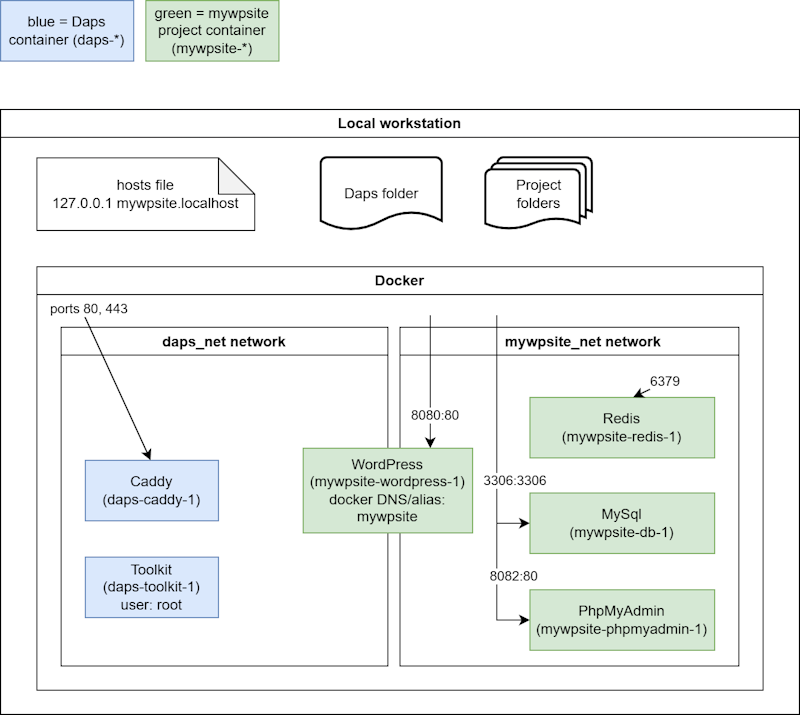
Note that all of the mywpsite containers are bound to ports on the host workstation (e.g. localhost:8080 binds to mywpsite-wordpress-1:80), so you can address them directly from the workstation. The hosts file acts as DNS, routing mywpsite.localhost to localhost, and then Caddy routes that name to the mywpsite-wordpress-1 container.
Remote
Section titled “Remote”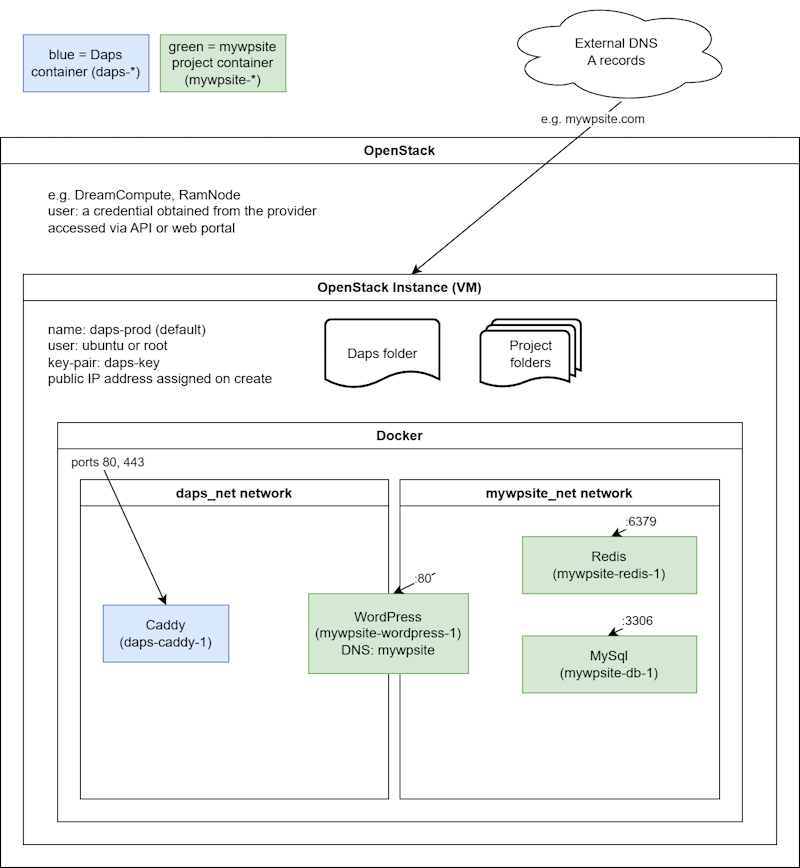
Note that none of the mywpsite containers are bound to ports on the VM because they only need internal routing from Caddy — they are isolated from the VM and the internet. Caddy is bound to the host instance ports 80 and 443, and then DNS (e.g. mywpsite.com) is routed to the host instance IP address. Caddy then routes mywpsite.com traffic to the mywpsite-wordpress-1 container.